content://cz.mobilesoft.appblock.fileprovider/cache/blank.html: Meaning and Fixes
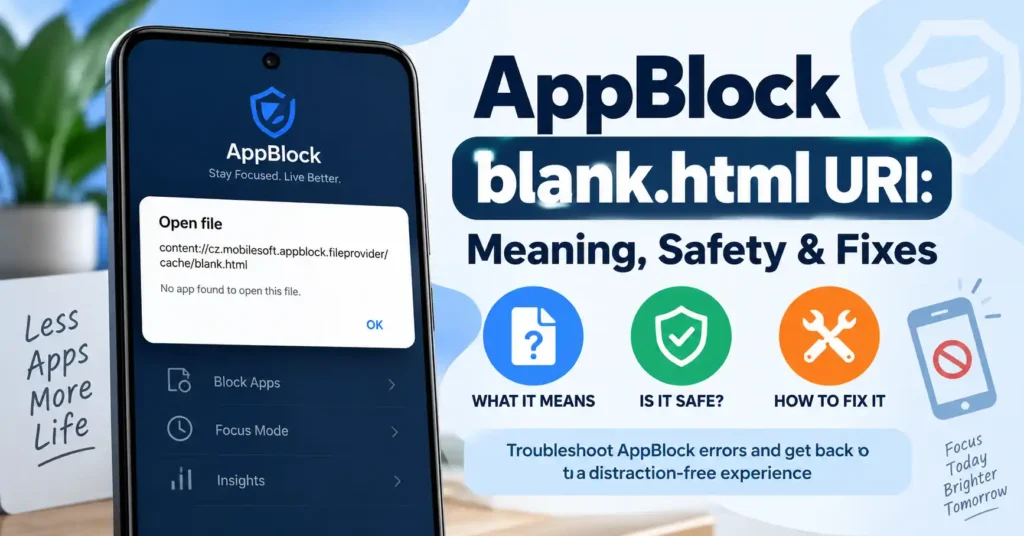
I treat content://cz.mobilesoft.appblock.fileprovider/cache/blank.html as one of those Android addresses that looks far more alarming than it usually is. Someone may notice it in a browser address bar, browsing history, a WebView, a diagnostic log, or after trying to open a website. Because it begins with content:// instead of the familiar https://, it is easy to assume that the address represents malware, a suspicious website, a broken browser, or an unusual internet redirect. The available evidence points in a much simpler direction. The package identifier cz.mobilesoft.appblock belongs to AppBlock, an Android app from MobileSoft that officially supports blocking websites and applications. Android documentation also confirms that FileProvider uses content:// URIs to provide controlled access to files. Multiple current technical sources specifically identify this complete URI as a reference to a cached blank.html file associated with AppBlock’s blocking behavior.
The distinction between a URI and an internet URL is central to understanding what is happening. content://cz.mobilesoft.appblock.fileprovider/cache/blank.html does not have the structure of a conventional public web address. The content:// scheme tells Android to resolve the resource through a content provider rather than contact a web server through HTTP or HTTPS. In this case, the authority contains AppBlock’s package identifier and a fileprovider component, while the remaining path points toward cache/blank.html. That does not automatically prove why the file was opened in every possible situation, but it strongly explains why AppBlock users may encounter a blank page after website blocking occurs.
Key Takeaways About the AppBlock blank.html URI
The easiest way to understand this unusual string is to separate what authoritative sources confirm from what current technical reporting infers from the exact URI.
content://is an Android content URI scheme, not an ordinary web protocol such as HTTP or HTTPS.cz.mobilesoft.appblockis the package ID of AppBlock on Google Play.- AppBlock is developed by MobileSoft and officially supports blocking apps, websites, URLs, and keywords.
- Android’s
FileProvidercreatescontent://URIs so files can be made available through controlled URI access rather than exposing raw file paths. - Current technical articles consistently describe
/cache/blank.htmlin this particular URI as a cached blank HTML page used in connection with AppBlock website blocking. - AppBlock’s official help documentation confirms its website-blocking functionality, although I did not find an official AppBlock page documenting this exact full URI string.
- Seeing the URI by itself is not evidence that you visited a public website with that address.
- It is also not, by itself, proof of malware.
- If you intentionally use AppBlock and see the URI immediately after opening a blocked website, that context strongly supports a normal blocking explanation.
- If you do not have AppBlock installed, see other unfamiliar behavior, or cannot connect the URI with AppBlock, additional investigation is sensible.
- Persistent blank pages can sometimes be addressed by reviewing AppBlock schedules, QuickBlock settings, website rules, permissions, updates, or official troubleshooting recommendations.
In my analysis, the most useful practical lesson is not to panic when the string appears. First determine whether AppBlock is installed and whether a blocking rule was active. That context answers most of the important questions much faster than treating the URI as though it were an unknown internet domain.
What content://cz.mobilesoft.appblock.fileprovider/cache/blank.html Means
The URI can be understood by dividing it into four logical parts:
content://
cz.mobilesoft.appblock.fileprovider
cache
blank.html
Each portion serves a different purpose.
The first part, content://, identifies the URI scheme. Android uses content URIs to identify data exposed through a ContentProvider or related provider implementation. With FileProvider, an application can generate a URI for a file and provide another component with controlled access to that resource. Android’s documentation explicitly describes generating and sharing file content URIs through FileProvider.
The next portion, cz.mobilesoft.appblock.fileprovider, functions as the authority. An authority identifies the provider Android should use to resolve the URI. The important recognizable component is cz.mobilesoft.appblock, which matches the package name of AppBlock’s Android application on Google Play. The store currently lists the developer as MobileSoft s.r.o. and describes AppBlock as an app and website blocking tool.
The /cache/ portion appears to refer to a file exposed from a cache-related location. Android’s FileProvider allows developers to configure specific file areas that may be represented through provider-generated content URIs. The precise mapping between the visible URI path and the application’s physical storage location depends on the app’s configuration, so readers should not assume that the URI displays a literal raw filesystem path.
Finally, blank.html is the resource name. Several current technical sources report that AppBlock uses this blank HTML resource as a local placeholder or replacement when website content is blocked. Because that exact behavior is documented primarily by independent technical articles rather than an AppBlock help page that names the literal file, I would describe it as a well-supported explanation rather than an officially documented implementation guarantee.
Breaking Down Each Part of the URI
The following table shows what can reasonably be concluded from the structure.
| URI Component | Likely Meaning | What It Tells Us |
|---|---|---|
content:// |
Android content URI scheme | Android is resolving content through a provider rather than treating it as a normal web URL |
cz.mobilesoft.appblock |
AppBlock Android package identifier | The authority is associated with the AppBlock application |
.fileprovider |
FileProvider authority naming | A file is being exposed through Android’s provider mechanism |
/cache/ |
Provider path associated with cached content | The resource is presented through a cache-related provider path |
blank.html |
HTML resource called blank.html | Current technical reports identify it as the blank resource associated with blocking |
| Full URI | Local Android content reference | It should not be interpreted like an https:// website address |
The most important distinction in the table is between the authority and the path. Android documentation firmly establishes how FileProvider and content URIs work, while the exact purpose of AppBlock’s blank.html is supported mainly by observations and technical articles about this specific URI.
Why content://cz.mobilesoft.appblock.fileprovider/cache/blank.html Appears
The most common explanation is that AppBlock has intercepted access to a website covered by one of its blocking rules.
AppBlock officially allows users to block specific websites. Its Android help documentation instructs users to create a Schedule or QuickBlock, choose the Webs section, and enter URLs they want to restrict. The same system can also block based on keywords, including keywords found throughout a URL when configured that way.
When a browser request is blocked, AppBlock needs some way to prevent the original site from continuing to display normally. Current technical reports about the exact URI indicate that the application can substitute a local blank HTML resource, resulting in content://cz.mobilesoft.appblock.fileprovider/cache/blank.html becoming visible instead of the original web page.
A simple hypothetical example helps explain the sequence. Imagine that someone configures AppBlock to restrict example-social-network.com between 9 a.m. and noon. At 10 a.m., they tap a saved link to that site. AppBlock recognizes that the website falls within an active blocking rule. Instead of allowing the normal page to remain available, the browsing flow may end at a local blank resource. If the browser exposes that local reference in its address interface or history, the unusual AppBlock FileProvider URI may become visible.
Nothing in that sequence requires the string itself to be an internet destination.
The Connection Between the URI and AppBlock
The AppBlock connection is unusually clear because the Android package name appears directly inside the URI.
Google Play lists AppBlock under the application ID cz.mobilesoft.appblock, and the developer is MobileSoft s.r.o. The current listing describes the app as a tool for blocking apps, websites, and social media. As of September 2026, the Play Store page shows more than 10 million downloads and indicates that the app was updated on August 19, 2026.
MobileSoft’s own company website separately identifies AppBlock as a project developed by its team and confirms that an Android version is available through Google Play.
The app’s purpose is summarized plainly in its Play Store description:
“Block Apps, Websites & Social Media to stay focused on important things!”
Google Play listing for AppBlock, MobileSoft s.r.o.
That description matters because it independently confirms the basic blocking function implied by reports about the blank HTML URI. In other words, the package belongs to a known website-blocking application, and AppBlock officially documents URL and keyword-based website blocking. The remaining piece, the use of this exact cached blank.html resource, comes from current technical reporting rather than an official help page naming the full URI.
What Android FileProvider Does
Understanding FileProvider makes the URI much less mysterious.
Android applications normally operate with storage protections that prevent arbitrary apps from freely reading one another’s private files. Sometimes, however, one app needs to provide controlled access to a file. Android’s FileProvider class is designed for that purpose.
The official Android documentation explains the mechanism directly:
“To share a file with another app using a content URI, your app has to generate the content URI.”
Android Developers
The documentation shows that a developer can configure a FileProvider with an authority and then generate a URI resembling:
content://com.mydomain.fileprovider/my_images/default_image.jpg
That example follows the same broad structure as:
content://cz.mobilesoft.appblock.fileprovider/cache/blank.html
Both start with content://, both contain a provider authority, and both identify a resource through a path.
From my perspective, this comparison is the most useful way to understand the strange address. It is not structured like a remote website. It resembles Android’s documented approach to referencing files through a provider.
Is This URI a Website?
No, it should not be treated as a normal public website address.
A typical website URL begins with a network scheme such as https://. The browser uses that URL to locate a host through the network and request a resource from a web server.
A content:// URI follows a different model. Android resolves the authority through the device’s content-provider system. Access occurs according to the provider implementation and any permissions or grants associated with the URI. Android’s FileProvider documentation explains that applications can send these generated content URIs to other apps and grant temporary permissions to access the referenced resource.
This distinction explains why pasting content://cz.mobilesoft.appblock.fileprovider/cache/blank.html into a desktop browser or another unrelated device would not behave like opening a public webpage.
The resource depends on the Android application and provider existing on the relevant device.
Is content://cz.mobilesoft.appblock.fileprovider/cache/blank.html a Virus?
The URI itself is not evidence of a virus.
Its authority contains the verified AppBlock Android package ID, and the URI structure is consistent with Android’s legitimate FileProvider mechanism. Current technical reports examining the exact address describe it as an AppBlock-related local resource rather than malware.
I would still avoid making the broader claim that any screen displaying those characters must automatically be safe. Text can be copied, imitated, or displayed by unrelated software. Security assessment should consider the whole device context rather than one string alone.
If AppBlock is installed from the official application store, an active website-blocking rule is running, and this URI appears exactly when restricted content is opened, the explanation is straightforward.
If AppBlock has never been installed, the phone is displaying unfamiliar applications, security warnings are appearing, or suspicious behavior continues outside normal blocking situations, then the URI should not be used as the sole reason to dismiss those concerns.
A legitimate-looking string cannot authenticate every process running on a device.
Is the AppBlock FileProvider URI Tracking You?
The URI itself does not prove tracking.
It identifies a resource through Android’s content-provider mechanism. That is fundamentally different from a remote analytics URL that sends a request to an internet server.
However, seeing a local content URI also does not tell someone everything an installed application may collect. Those are separate questions.
Google Play’s current Data safety section for AppBlock states that the developer has declared collection of several data categories and possible sharing of certain categories with third parties. The listing also says data is encrypted in transit and that users can request deletion. Google notes that these declarations are developer-provided and may vary with use, region, and age.
I would therefore distinguish between two questions:
- Does
content://cz.mobilesoft.appblock.fileprovider/cache/blank.htmlitself look like a remote tracking website? No. - What information does AppBlock collect or process as an application? That should be evaluated through the app’s current privacy disclosures and settings.
Confusing those questions can lead to inaccurate conclusions in both directions.
When Seeing the URI Is Probably Normal
Several contextual signs support the interpretation that the URI is simply part of AppBlock’s expected blocking behavior.
You have AppBlock installed.
You knowingly created a website block.
A Schedule or QuickBlock is currently active.
The URI appears immediately after opening a restricted website.
The page becomes unavailable exactly when your AppBlock rules say it should.
Removing or pausing the relevant rule restores normal access where permitted.
In that situation, the blank page is consistent with the purpose of a website blocker.
AppBlock’s official documentation confirms that users can create blocking schedules and QuickBlock configurations that target websites and keywords.
When the Blank Page Deserves Troubleshooting
The URI may require attention when it appears in circumstances that do not match the blocking behavior you intended.
Examples include:
- Websites you never intended to block are becoming unavailable.
- Blocking continues after a schedule should have ended.
- AppBlock behaves inconsistently after an update or restart.
- The app is blocking broader categories than expected.
- Website blocking has stopped working correctly.
- AppBlock’s own settings no longer match observed behavior.
- The blank page appears repeatedly even after you intentionally disable relevant restrictions.
AppBlock’s official troubleshooting documentation acknowledges several blocking-related situations. It advises checking blocking settings, active Schedules, QuickBlock, required permissions, troubleshooting options, app updates, and supported browsers. In some cases, the company recommends restarting the phone or reinstalling AppBlock after creating a backup.
The support documentation also notes that apps can sometimes remain blocked after a schedule ends or blocking is paused. AppBlock says restarting the device can temporarily resolve that particular issue while its developers investigate it.
That means an unexpected blank page is not necessarily a security problem. It may instead reflect a blocking configuration or application behavior that needs troubleshooting.
Normal Appearance Versus a Potential Problem
This comparison can help determine the appropriate response.
| Situation | Likely Interpretation | Recommended Action |
|---|---|---|
| URI appears after opening a deliberately blocked site | Normal AppBlock behavior is likely | No action needed unless you want access |
| URI appears while an AppBlock Schedule is active | Consistent with website blocking | Check the schedule if the block is unwanted |
| Website is blocked by an unexpected keyword | Blocking rule may be too broad | Review website and keyword rules |
| Pages remain blocked after a schedule ends | AppBlock may not have resumed expected activity | Restart and follow official troubleshooting |
| Website blocking does not work consistently | Permissions or configuration may need attention | Check Accessibility, settings, updates, and supported browser |
| URI appears although you believe AppBlock is not installed | Context does not fit the normal explanation | Verify installed apps and investigate further |
| Other serious security symptoms occur | Do not diagnose from this URI alone | Use Android security tools and trusted support |
| AppBlock is no longer wanted | Application itself may be unnecessary | Remove it through normal Android app management if permitted |
The main takeaway is that the same URI can be harmless in the expected context and confusing when the surrounding behavior does not match your configuration.
How to Stop content://cz.mobilesoft.appblock.fileprovider/cache/blank.html From Appearing
If the URI appears because AppBlock is intentionally blocking websites, the most direct solution is not to manipulate blank.html. Instead, change the blocking rule responsible for sending you there.
Step 1: Check Active Schedules
Open AppBlock and review active Schedules.
Look for a schedule that includes the website you are trying to visit. Remember that AppBlock can block both apps and websites within the same schedule.
If the website should no longer be blocked, modify the schedule according to your intended focus settings.
Step 2: Check QuickBlock
QuickBlock can apply temporary restrictions separately from your normal schedules.
If a site seems blocked even though its schedule looks correct, check whether QuickBlock is active. AppBlock’s official troubleshooting documentation specifically recommends checking both Schedules and QuickBlock when restrictions do not behave as expected.
Step 3: Review Website Rules
AppBlock lets users enter specific website addresses in the Webs section.
A rule may cover more than expected because AppBlock’s documentation notes that website blocking focuses on the main URL. Review the sites listed in the active configuration and remove any that should remain available.
Step 4: Review Keyword Blocking
Keyword blocking can have broader effects than blocking one specific domain.
AppBlock allows keyword checks against a domain and can also be configured to match a keyword anywhere in a URL. A general keyword can therefore restrict many unrelated pages if they share that text.
For example, a hypothetical rule blocking the word “video” anywhere in a URL could affect far more pages than a rule targeting one entertainment domain.
If unexpected websites lead to the blank URI, broad keyword restrictions deserve particular attention.
Step 5: Check AppBlock Permissions
AppBlock states that website and keyword blocking relies on Android Accessibility permission. Its official settings guide says Accessibility allows the app to read the current screen and detect interactions required for advanced blocking features.
If blocking behavior is inconsistent rather than excessive, check the permissions AppBlock itself says it needs.
Avoid granting unrelated permissions merely because a third-party troubleshooting article recommends them. The official AppBlock support documentation should take priority for current permission requirements.
Step 6: Update AppBlock
AppBlock’s troubleshooting guidance recommends ensuring that the app is up to date when website blocking does not work correctly.
The Google Play listing showed an update dated August 19, 2026 when checked for this article, but newer versions may be available when you read it.
Step 7: Restart the Device When Blocking Gets Stuck
AppBlock specifically recommends a device restart for some cases in which apps remain blocked after a schedule ends or blocking has been paused.
A restart is a reasonable low-impact troubleshooting step before resetting more extensive configuration.
Step 8: Reinstall Only When Necessary
Official AppBlock troubleshooting documentation suggests reinstalling the application when persistent blocking problems continue. Importantly, AppBlock warns that reinstalling can erase existing blocking settings unless a backup has been created first.
I would therefore treat reinstallation as a later step rather than the first response to seeing one blank page.
Should You Delete blank.html Manually?
I would not recommend trying to locate and manually delete the underlying file as the normal fix.
The visible URI is presented through a FileProvider, not as a conventional public filesystem path. Android’s provider model exists partly to control how files are accessed by other applications.
More importantly, if AppBlock intentionally uses the blank file as part of its blocking process, deleting one temporary resource would not address the actual configuration telling AppBlock to block a website.
The correct target is the block rule, schedule, QuickBlock state, app configuration, or application installation, depending on what you want to accomplish.
Trying to manipulate internal application data can also create unnecessary problems without solving the reason the URI appears.
Why the URI May Appear in Browser History
Several technical reports say the AppBlock blank URI can appear in browser history after a blocked website is replaced with the local resource.
This can be confusing because browser history is normally interpreted as a list of websites someone visited.
A content URI changes that assumption.
If the browser displays or records the local resource AppBlock loaded, its presence in history does not necessarily mean the device contacted a public site called cz.mobilesoft.appblock.fileprovider.
There is no conventional internet hostname in the URI.
For parents, administrators, or users reviewing their own browsing records, context therefore matters. Treating every history entry beginning with content:// as a remote website can produce incorrect conclusions.
Why It May Appear Inside Android WebView
Android applications can display web-style content through embedded browser components rather than launching a full browser interface.
Third-party technical explanations of the AppBlock URI frequently connect blank.html with browser or WebView behavior.
The broader technical model is plausible because Android content URIs can be supplied to other app components when permission is available, while HTML resources can be displayed inside web-capable interfaces.
However, I would avoid claiming that every appearance of the URI is generated through exactly the same WebView code path. The implementation can change between app versions, browser versions, and Android releases.
For users, the important distinction is simpler: a page can be local to the device even when it appears inside an interface that normally displays websites.
Common Misconceptions About the AppBlock FileProvider URI
Mistaking It for a Public Domain
The string contains dots, slashes, and a filename, which makes it resemble an internet address.
It is still a content:// URI.
The dots inside cz.mobilesoft.appblock.fileprovider form an Android provider authority associated with an application package, not a conventional website domain that a browser resolves through normal HTTP networking.
Assuming It Automatically Means Malware
The structure is consistent with Android’s legitimate provider framework, and the package identifier matches AppBlock.
That is strong evidence against treating the URI itself as a malware indicator.
Assuming It Proves AppBlock Is Tracking Browsing
A content URI does not by itself show that data was transmitted to a remote analytics server.
Privacy questions about AppBlock should be answered through the application’s privacy disclosures and permissions rather than inferred from one local URI.
Assuming blank.html Is a Browser Error
The exact file is widely described by technical sources as a blocking placeholder, so a blank page may represent successful restriction rather than browser failure.
If the restriction was intentional, there may be nothing to fix.
Assuming Clearing All App Data Is the Best First Step
Resetting an application can remove settings and create more work.
AppBlock’s official guidance recommends checking configuration, permissions, updates, restart options, and backups when troubleshooting.
A targeted configuration change is preferable when one blocking rule is the real cause.
What to Do If You Never Installed AppBlock
This situation deserves more careful investigation because the obvious explanation is missing.
First, check the installed-app list for AppBlock. Its current Google Play package is cz.mobilesoft.appblock, and the official developer is MobileSoft s.r.o.
It is possible that someone else with legitimate access to the device installed the application, or that it was configured earlier and forgotten.
If AppBlock truly is not present, consider where you saw the URI.
A screenshot, copied text, imported browser record, synced history item, support article, message, or diagnostic report can contain a URI even when the corresponding provider is not currently installed.
Seeing the text somewhere does not prove that Android resolved the provider on that device.
If unfamiliar applications, unusual permissions, account changes, persistent advertisements, unexpected device-admin settings, or other security symptoms are present, evaluate those symptoms separately using trusted Android security guidance. Do not rely on the AppBlock-looking URI either to prove malware or dismiss it.
How AppBlock Permissions Relate to Website Blocking
AppBlock’s official Android settings documentation provides useful context about how website blocking works.
The company says Accessibility permission is used for advanced blocking functions including websites and keywords, device-settings blocking, split-screen blocking, and some content controls. It also describes separate purposes for notification access, location, and Device Admin.
This matters because users sometimes see a blank page and then respond by randomly disabling permissions.
Doing so may make blocking behavior less predictable.
If the goal is to stop one website from being blocked, edit the relevant rule.
If the goal is to stop using AppBlock entirely, disable or remove the application according to normal Android controls and any Strict Mode limitations you intentionally configured.
If the goal is to troubleshoot a feature that should work, follow the permission recommendations in AppBlock’s current official documentation.
The desired outcome should determine the fix.
For Developers: What the URI Structure Tells You
Developers debugging the URI can learn quite a lot from its format without knowing AppBlock’s private implementation.
The scheme tells Android to use content resolution.
The authority identifies the provider.
The path identifies a resource exposed through the provider’s configured mapping.
Android’s official FileProvider example demonstrates the same relationship between an authority and a file-specific path.
Developers should not assume that /cache/blank.html is a freely readable physical path on disk. FileProvider can map configured directories to public-facing path names, and access depends on the application’s provider configuration and URI permissions.
Likewise, the presence of .fileprovider in an authority is a naming convention chosen by the application. The security properties depend on how the provider is actually configured, not merely on the authority containing that word.
For ordinary users, these implementation details are unnecessary. For debugging, however, they explain why opening the URI outside its intended application context may fail even though the resource worked during AppBlock’s normal operation.
A Practical Decision Guide
When the URI appears, I would use this sequence rather than immediately resetting the phone:
- Confirm whether AppBlock is installed.
- Determine whether a website, application, Schedule, or QuickBlock rule was active when the URI appeared.
- Check whether the original destination was supposed to be blocked.
- If the block was intentional, treat the blank page as expected unless another problem is present.
- If the block was accidental, inspect website and keyword rules.
- If blocking continues after it should stop, restart the device and consult AppBlock’s current troubleshooting guidance.
- If website blocking is malfunctioning, verify updates, Accessibility permission, troubleshooting settings, and browser compatibility.
- If reinstallation becomes necessary, create a backup first if you want to preserve your configuration.
- If AppBlock is absent or other suspicious symptoms exist, investigate those symptoms separately rather than assuming the URI explains everything.
This approach preserves useful AppBlock settings while addressing the actual reason a blank page appears.
Why Accurate Interpretation Matters
Technical-looking Android strings often create unnecessary fear because they expose implementation details that users normally never need to see.
content://cz.mobilesoft.appblock.fileprovider/cache/blank.html combines an unfamiliar protocol, reverse-domain package naming, the word fileprovider, a cache path, and an HTML filename. Each part looks technical, but none is inherently suspicious.
Android officially uses content:// URIs as part of its content-provider architecture, and FileProvider specifically supports controlled access to files through such URIs.
AppBlock officially exists under the package ID embedded in the URI and explicitly offers website blocking.
Current independent technical sources repeatedly connect the exact full path with a local blank resource used when AppBlock blocks content.
Together, those pieces create a coherent explanation without requiring dramatic assumptions about malware or hacking.
At the same time, careful wording matters. Because AppBlock’s own support pages do not appear to publish a technical specification for this exact URI, I would not claim that every app version must always use the file in precisely the same way.
Good technical guidance separates documented architecture, verified package information, observed behavior, and inference.
Conclusion
I believe content://cz.mobilesoft.appblock.fileprovider/cache/blank.html is much easier to understand once we stop reading it as a public website. The content:// scheme belongs to Android’s content-provider system, cz.mobilesoft.appblock matches AppBlock’s official Android package, and Android’s FileProvider architecture is designed to expose files through controlled content URIs. Current technical reporting consistently identifies the remaining cache/blank.html path as a local blank resource associated with AppBlock website blocking.
For most AppBlock users, seeing the URI after opening a deliberately restricted site is therefore more consistent with blocking behavior than with malware. If it appears unexpectedly, the best response is to review active Schedules, QuickBlock, website rules, keyword rules, permissions, and AppBlock’s official troubleshooting guidance rather than trying to delete internal files manually.
My practical recommendation is to judge the URI by context. Confirm AppBlock is installed, identify which rule was active, and troubleshoot only when the resulting blank page does not match the behavior you intended.
Read More : Plangud: Meaning, Timber Uses & Planning Explained
Frequently Asked Questions
What Is content://cz.mobilesoft.appblock.fileprovider/cache/blank.html?
content://cz.mobilesoft.appblock.fileprovider/cache/blank.html is an Android content URI associated with AppBlock’s package and a FileProvider resource. Android documentation confirms that FileProvider can generate content:// URIs for controlled file access, while AppBlock’s official Google Play listing confirms that cz.mobilesoft.appblock is its Android package ID. Current technical sources specifically describe cache/blank.html as a local blank resource associated with blocked website content.
Is content://cz.mobilesoft.appblock.fileprovider/cache/blank.html a Virus?
The URI itself is not evidence of a virus. Its structure matches Android’s legitimate content-provider system, and the package identifier embedded within it belongs to AppBlock, a website and app blocker published by MobileSoft. If AppBlock is installed and the URI appears after a restricted website is opened, that is consistent with normal blocking behavior. Other unexplained security symptoms should still be investigated separately.
Why Does AppBlock Show a Blank Page?
Current technical sources report that AppBlock may use the blank.html resource as a local replacement when website content is blocked. AppBlock’s own documentation independently confirms that its Android application can block specific URLs and keywords through Schedules and QuickBlock. If the restriction is intentional, a blank page may simply indicate that the requested website was prevented from loading normally.
How Do I Remove content://cz.mobilesoft.appblock.fileprovider/cache/blank.html?
Do not focus on deleting the internal file. Instead, check the AppBlock rule causing the website to be restricted. Review active Schedules, QuickBlock, website entries, and keyword blocks. If restrictions remain active unexpectedly, AppBlock’s official support recommends checking settings, restarting the device in some cases, updating the application, and using its troubleshooting guidance. Reinstallation is a later option, and AppBlock recommends creating a backup first if existing settings need to be preserved.
Is content:// the Same as https://?
No. https:// normally identifies a network resource accessed through the web, while content:// identifies content resolved through Android’s content-provider framework. Android’s official FileProvider documentation shows applications generating content URIs such as content://com.mydomain.fileprovider/... for controlled file access. This is why the AppBlock URI should not be interpreted as though cz.mobilesoft.appblock.fileprovider were an ordinary website domain.
Why Is the AppBlock URI in My Browser History?
Technical reports about this exact URI indicate that browsers may record the local blank resource after AppBlock intercepts a blocked webpage. Its appearance in history therefore does not necessarily mean that the phone contacted a public website named cz.mobilesoft.appblock.fileprovider. If AppBlock was active and the history entry corresponds with a restricted page, the local-blocking explanation is the most straightforward.
What Should I Do if AppBlock Keeps Blocking Websites After a Schedule Ends?
AppBlock’s official troubleshooting page acknowledges situations in which blocking can persist after a schedule ends or blocking is paused. The company currently recommends restarting the device as a temporary solution for that particular issue. It also advises keeping AppBlock updated and reviewing its troubleshooting settings when website blocking behaves incorrectly. If the problem continues, use AppBlock’s official support channel rather than modifying internal provider files.
What if I See the URI but Do Not Use AppBlock?
First verify whether AppBlock is actually installed, because cz.mobilesoft.appblock is the official Android package identifier shown on Google Play. If the app is absent, consider where the string appeared. It could exist in copied text, synced history, screenshots, logs, or another record without being actively resolved on the device. If other suspicious behavior exists, investigate those symptoms separately rather than diagnosing the phone from this URI alone.
Sources and References
- Android Developers,
FileProviderAPI reference and documentation explaining generation and permission-controlled use ofcontent://file URIs. - Google Play, AppBlock listing confirming package ID
cz.mobilesoft.appblock, developer MobileSoft s.r.o., website-blocking purpose, current app information, and Data safety disclosures. - AppBlock official Android help, website and keyword blocking instructions.
- AppBlock official Android troubleshooting documentation covering blocking settings, Accessibility permission, updates, restart recommendations, backup, and reinstallation.
- AppBlock official Android settings documentation explaining Accessibility and other permissions used by the application.
- MobileSoft, official AppBlock project page confirming development of the application and its Android availability.
- Technology Bazaars, independent technical explanation of the exact
content://cz.mobilesoft.appblock.fileprovider/cache/blank.htmlURI and its reported use as an AppBlock blank resource. - Geeks Kai, independent technical discussion of the AppBlock FileProvider URI, its path components, appearance, and troubleshooting context.
- HideMyAcc, independent explanation connecting the exact URI with AppBlock website blocking and the
blank.htmlresource.
Disclaimer
This article provides general educational and technical information about content://cz.mobilesoft.appblock.fileprovider/cache/blank.html. AppBlock’s implementation may change between application versions, Android releases, devices, and browsers. Android and AppBlock documentation confirm the general FileProvider architecture, package identity, permissions, and website-blocking features, while the exact purpose of the cache/blank.html resource is documented primarily by independent technical sources rather than an official AppBlock specification naming the complete URI. If a device shows signs of compromise beyond this URI, use trusted Android security resources or qualified technical support rather than assuming the URI alone proves or disproves a security problem.